Tableau
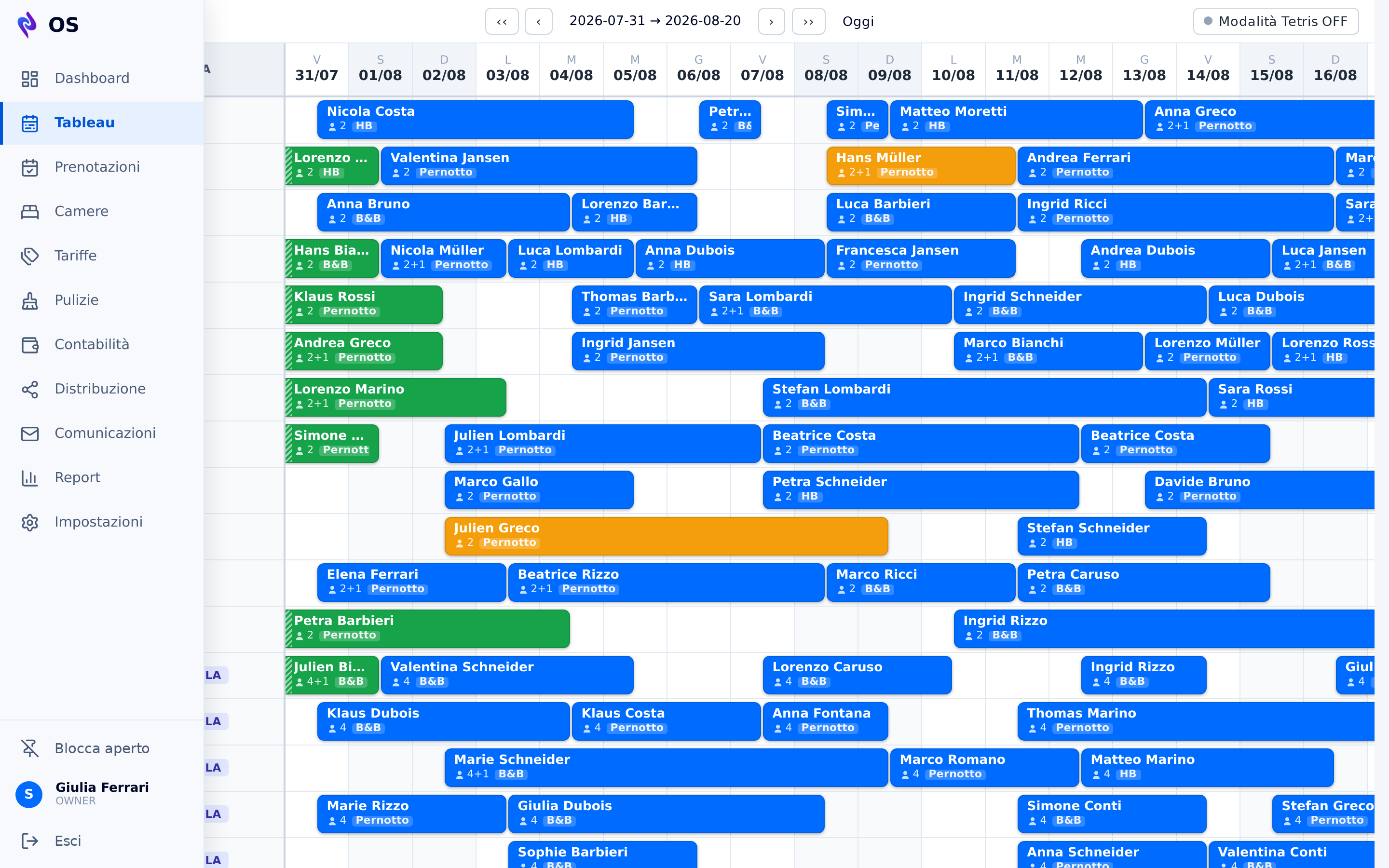
The room plan at a glance, with drag-and-drop booking moves and inventory checks that rule overbooking out.
VenusLab OS
Rooms, bookings, accounts and compliance in one place — and the repetitive part done by itself. It is where the hotel's data is born, and where pricing, costs and guest replies start from.
Automation
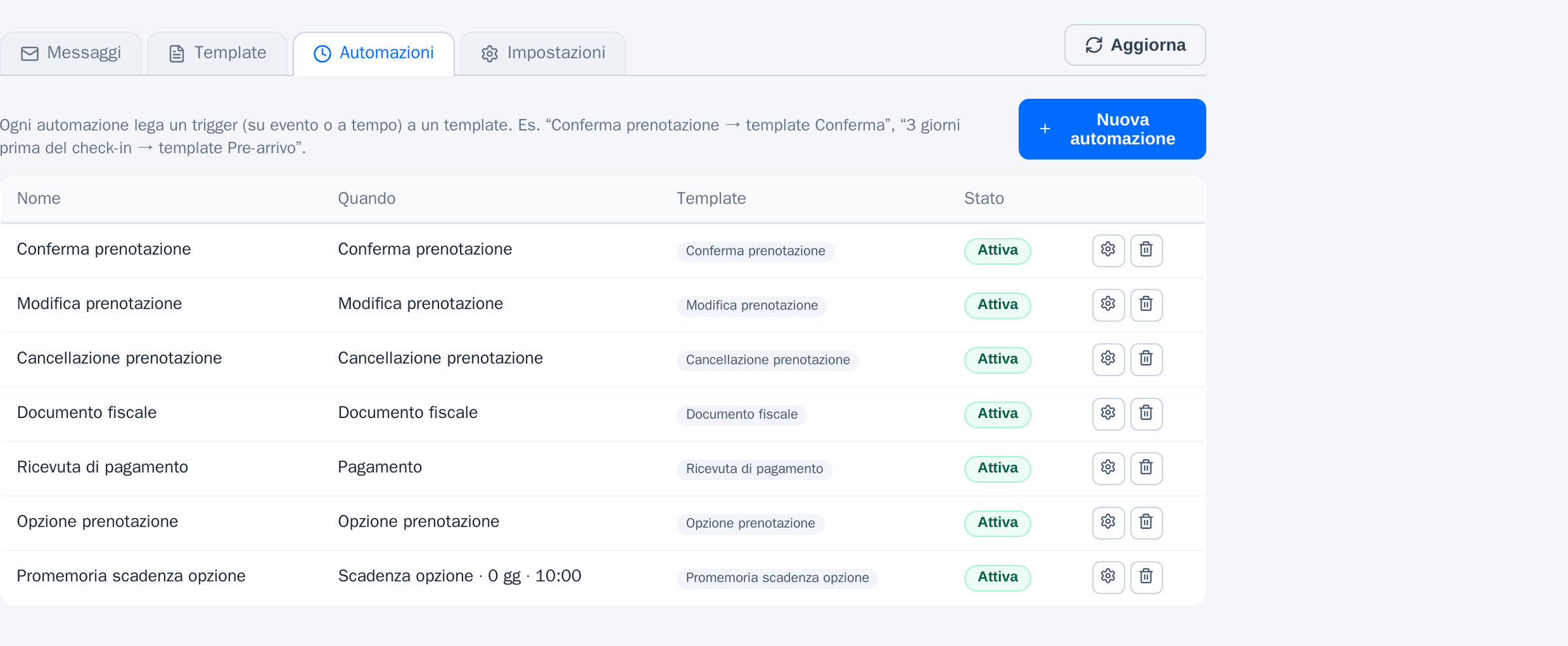
The difference between a PMS and an operating system is not the number of screens: it is how much of the work happens without anyone doing it. These nine run by themselves in OS, from data the system already holds.
Confirmation, amendment, cancellation, payment receipt, option expiry reminder: each rule ties an event to a template, and goes out on its own. You write the text once.
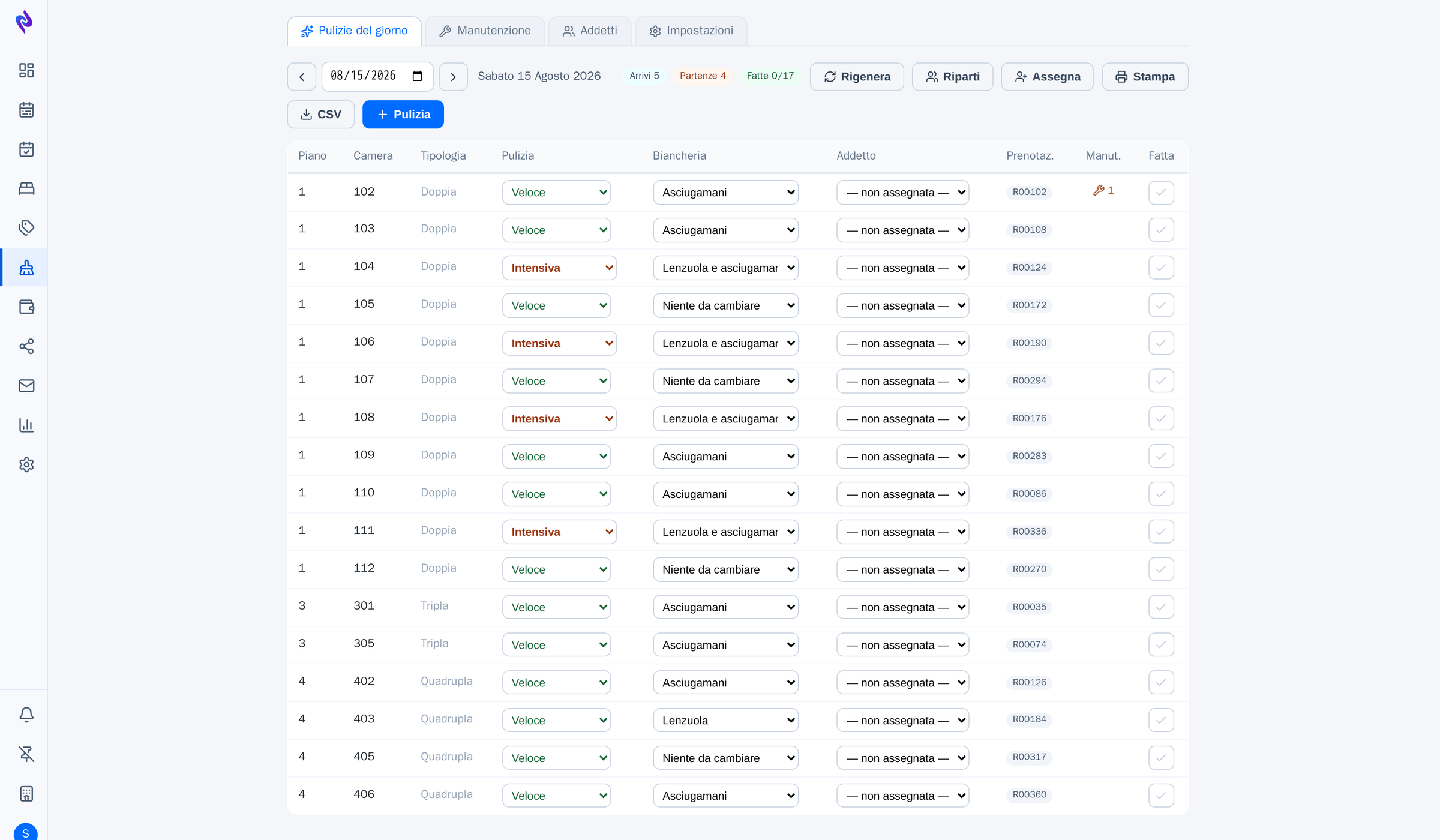
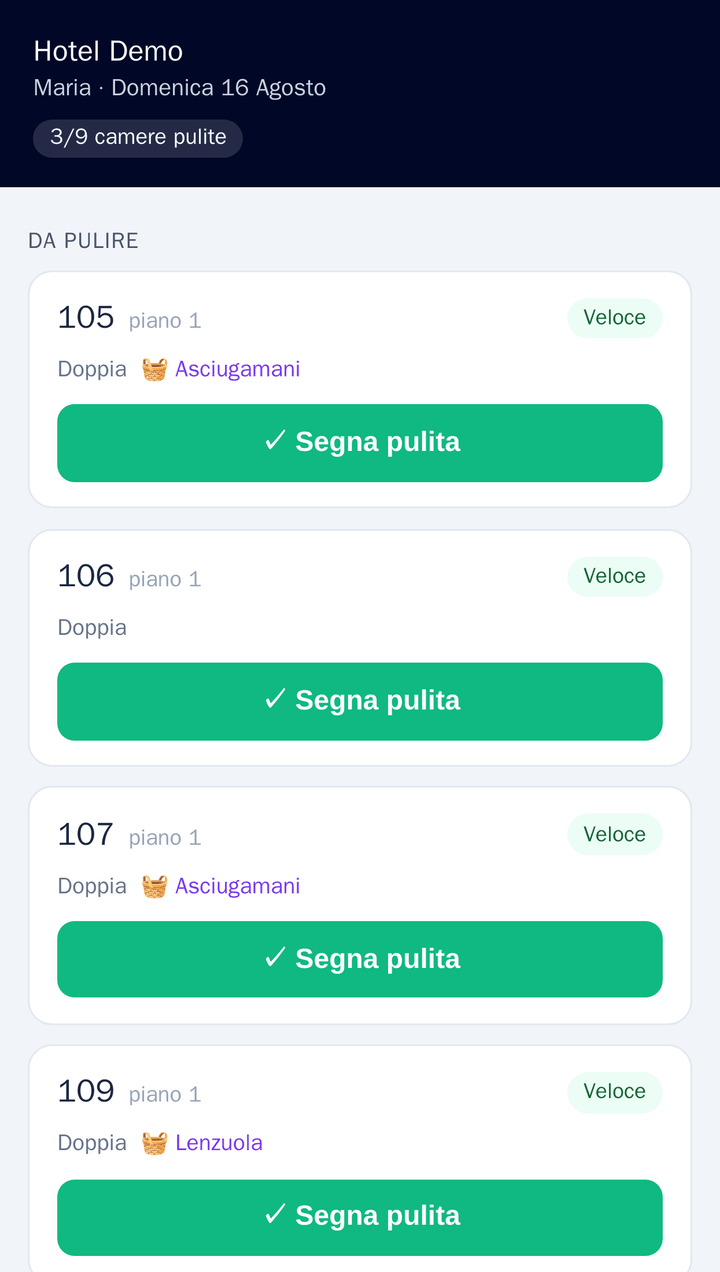
Built from arrivals, departures and who is staying on: quick clean or deep clean, linen changed or not. The housekeeper opens a list that is already made, and corrects it if she needs to.
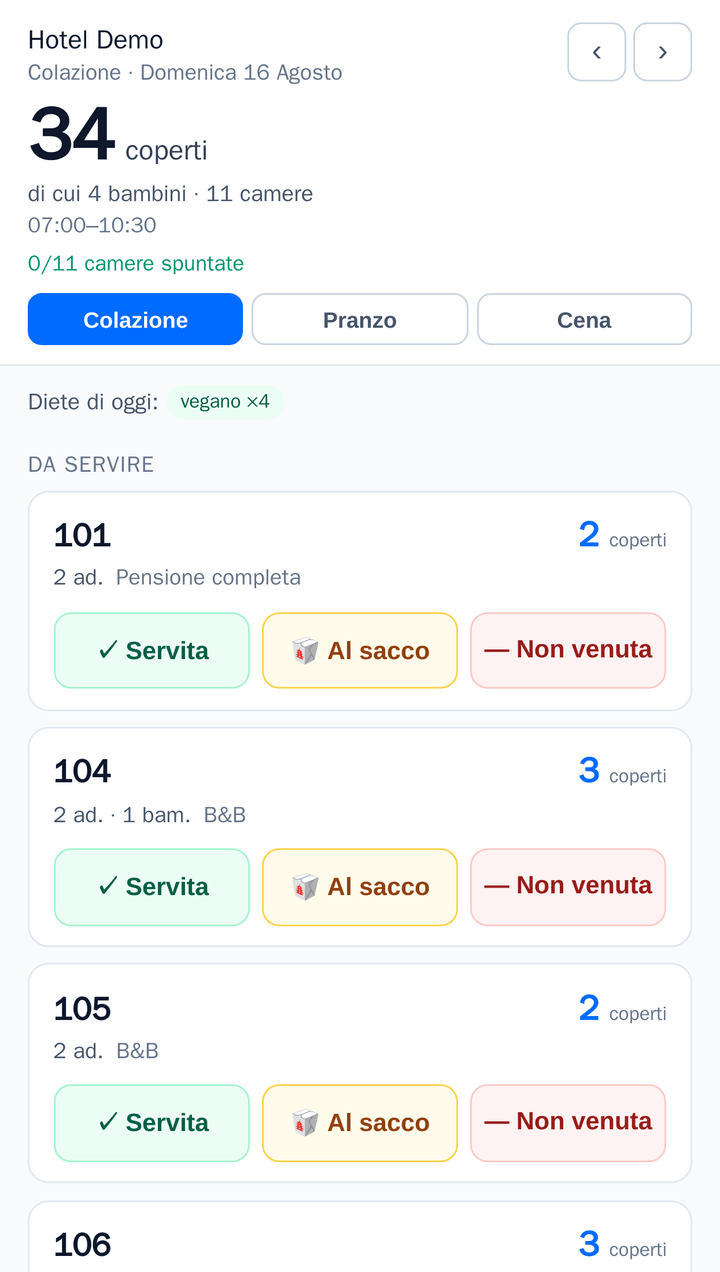
Who is entitled to breakfast, lunch or dinner comes from the board type on the booking, not from a sheet kept by hand in the dining room. Covers count themselves, dietary needs included — and yesterday's attendance corrects tomorrow's forecast.
The rules are written once — season, night band, per person or per room, age exemptions — and from there the calculation lands in the booking totals without anyone redoing it.
Charges follow the stay night by night. At month end the accounts are checked, not reconstructed backwards from a pile of receipts.
Electronic invoices and commercial receipts are built from the closed folio and filed with the revenue agency. The numbering, the series and the archiving are not yours to keep.
What sells at the property goes down to the portals, and bookings from the portals land on the tableau without passing through an inbox.
A booking that came in without a room is often not overbooking: the room exists, it is just in the wrong place. Where moving stays that have not arrived yet is enough, OS redoes the layout by itself — and nobody moves a guest who already has the key.
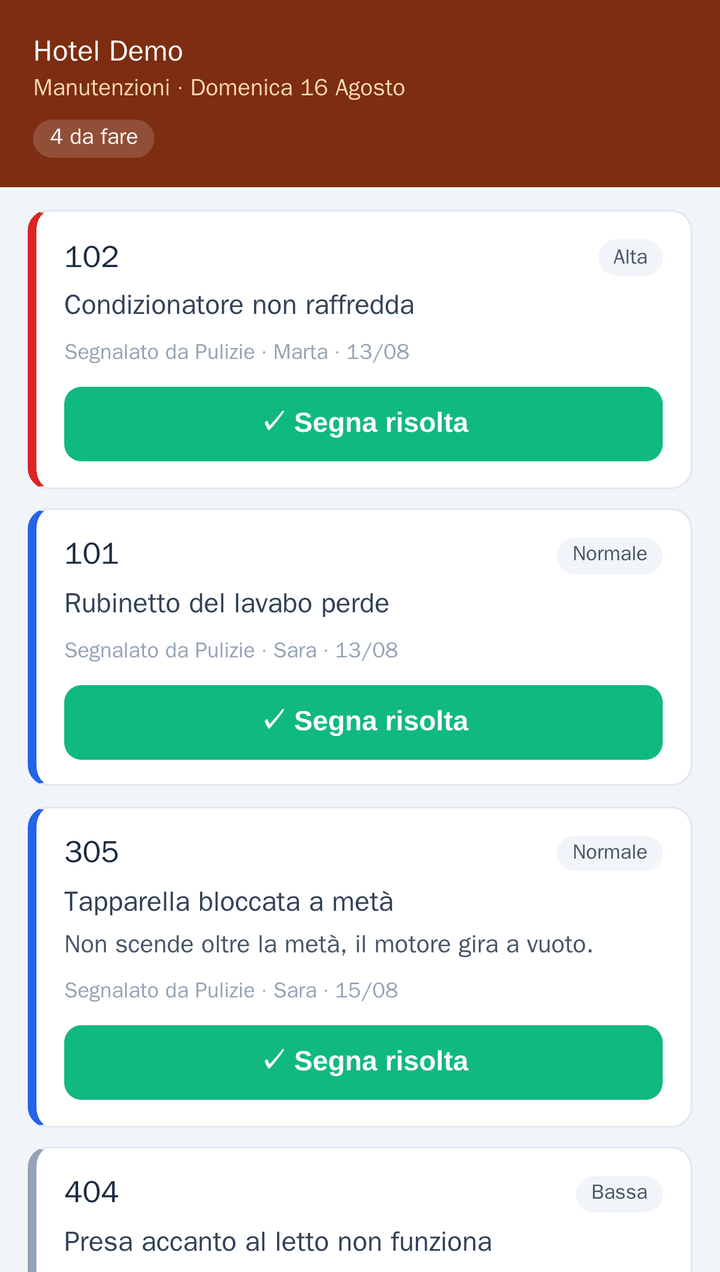
Housekeeping reports a fault from their own page, with no account and nothing to install. From there it shows on reception's tableau, with the priority next to the room number, and on the technician's list — who has a page of their own and closes it there.
Most hotels keep the PMS in one place, the channel manager in another, the accounts in a spreadsheet and the tourist tax in a portal somebody fills in by hand the month after. They are connected, but the connection carries the result and not the rule behind it: each one counts in its own way, and at month end there are two truths. In OS the data is written once, and what counts as an available room is decided once, for everyone.
The room plan at a glance, with drag-and-drop booking moves and inventory checks that rule overbooking out.
Search, amend, check in and check out. Every action stays on the activity log.
Room types, layouts, rate plans and restrictions: the foundation every other module works on.
Connections to your sales channels and your own direct booking site, on the same availability as the tableau.
Payments, receipts and documents, with the books closing themselves instead of being rebuilt at month end.
Tourist tax and VAT worked out from data already in the system, not retyped into a spreadsheet on the side.
The day's room plan for the floor team, lined up with arrivals, departures and stayovers.
Breakfast, lunch and dinner: covers, board types and dietary needs for each service, taken from the stays instead of a list kept by hand.
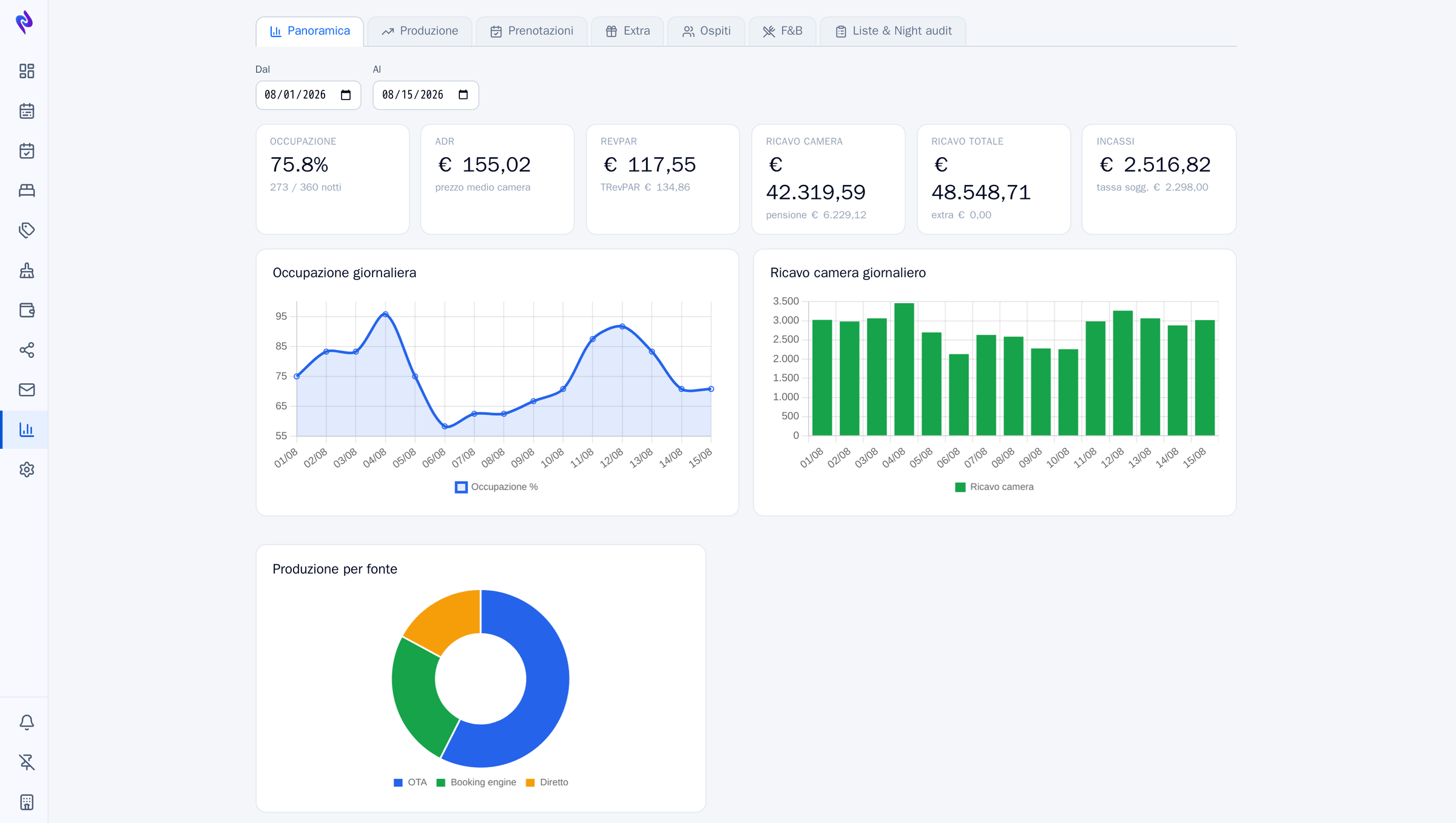
Occupancy, revenue and production at a glance, on the same numbers that feed every other module.
Booking engine
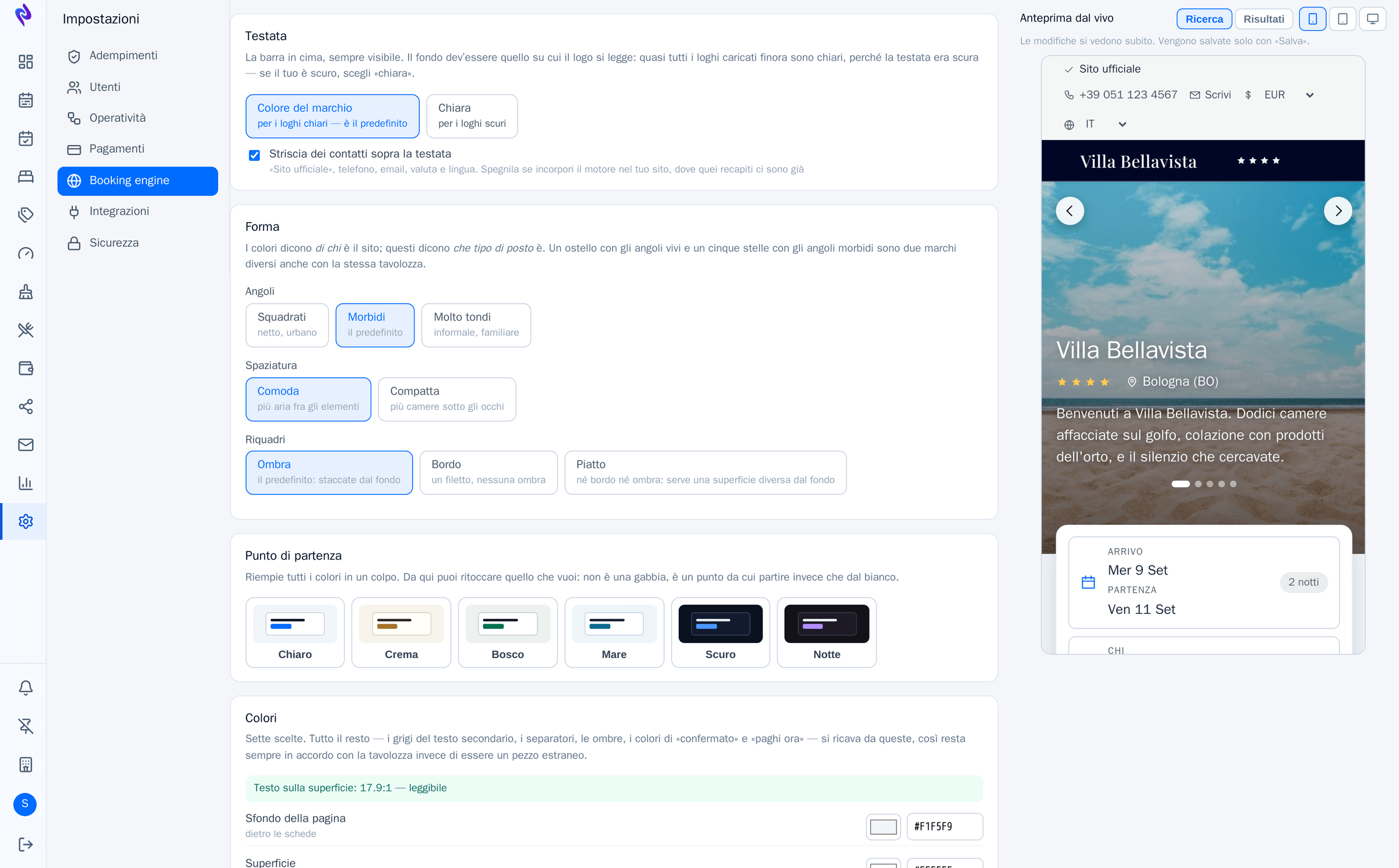
The booking engine is the one part of the PMS your guests ever see: if it looks like a hundred other hotels', the first thing it says is that you aren't you. Seven colours, six typefaces and three ways to lay out the rooms — and then the shape: sharp corners or rounded, tight rows or airy ones, cards with a shadow or a hairline. Colours say whose the site is; these say what kind of place it is.
There is also the cover gallery and how tall it should stand, your logo in place of the name, and the contact strip you can switch off when you embed the engine in the site you already have. Every choice shows applied as you make it, on the real page, in a panel alongside.
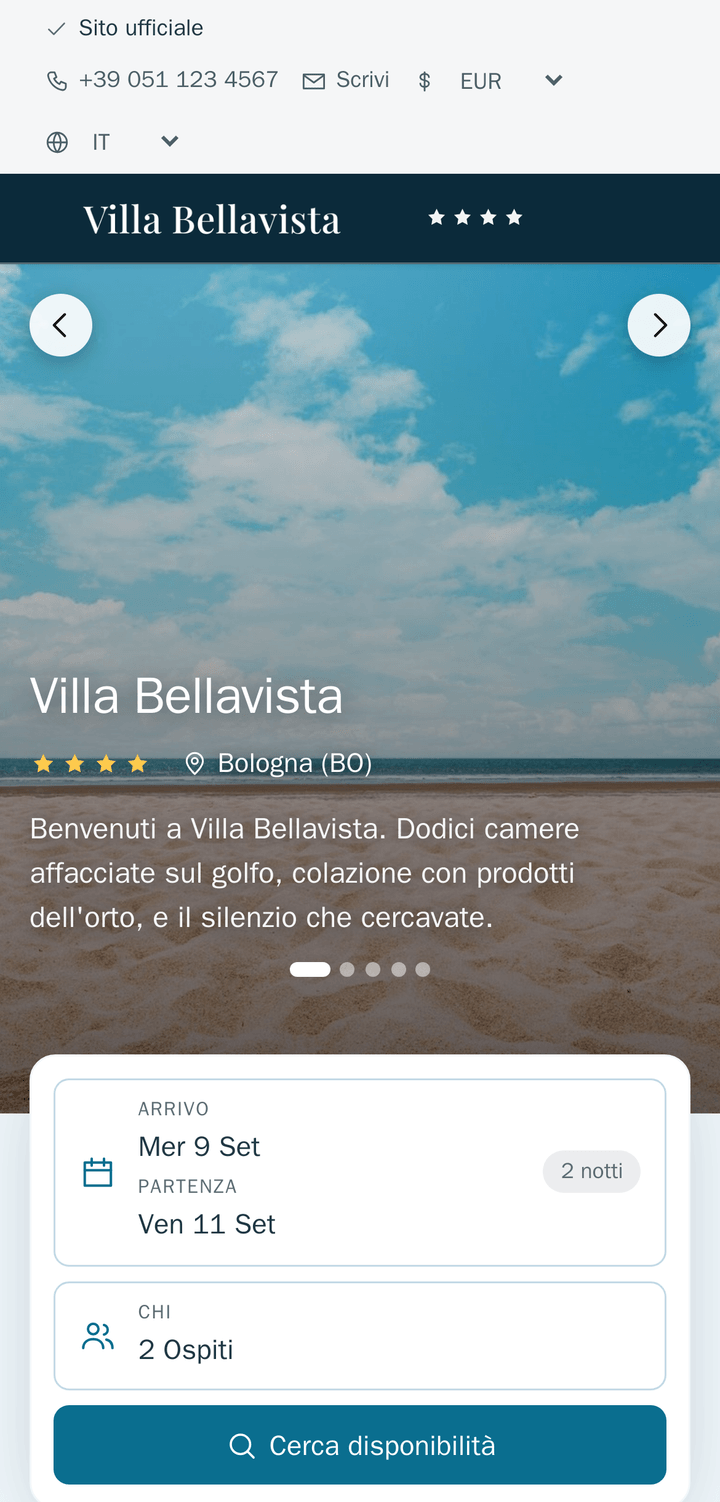
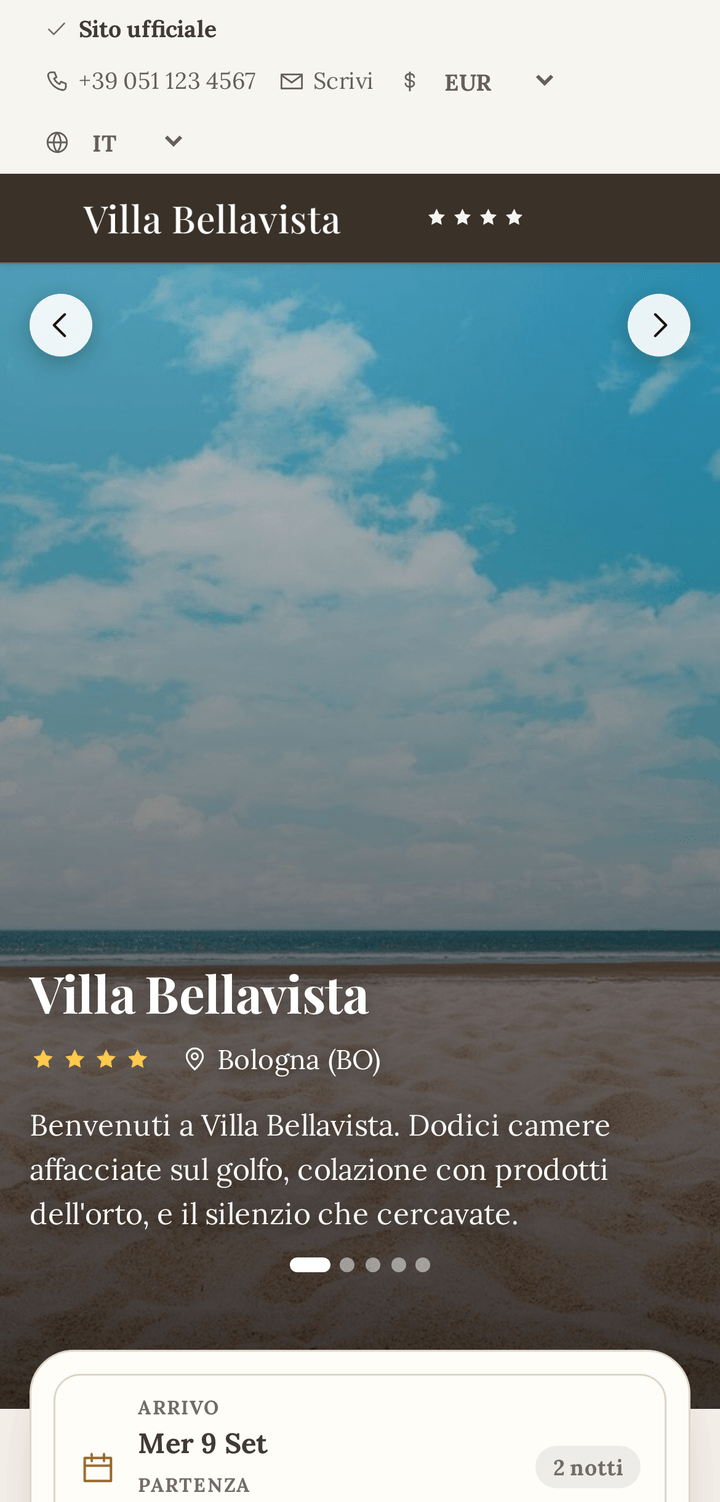
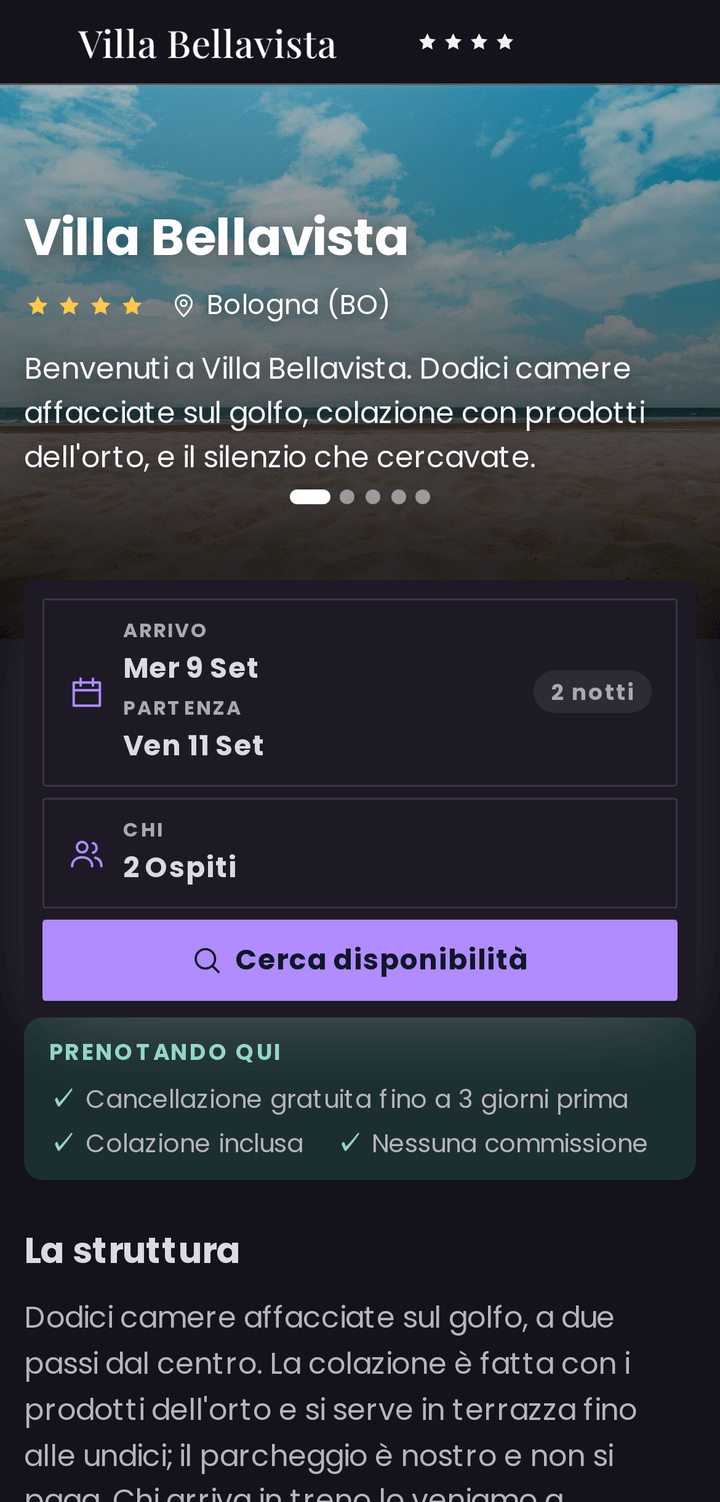
These are not three hotels: it is the same hotel, the same dates, the same day. Only the settings change.
Selling direct
A guest who comes to your site and finds less than a portal offers goes back to the portal, and you pay commission on that booking for good. These are the things the OS engine already does, with no add-on modules and no second supplier to plug in.
Parking, breakfast on the terrace, a transfer: added to the basket while booking, each with its own VAT and its own availability. What goes on the card as a guarantee is still the room alone — parking carries no no-show penalty.
A word that discounts the price, or that reveals rates nobody else sees — the newsletter offer, the company agreement. Or both at once, with a usage cap that cannot be broken through even by booking at the same instant.
The reasons not to go through a portal are yours to write, and they appear above the rooms. Facts you can honour — the cancellation terms, the breakfast, the fee that isn't there — not a comparison against someone else's price that goes stale on its own.
Description, amenities with their icons, where you are, arrival and departure times, photographs. And for each room the square metres, how many people fit, what beds there are and what is inside. A guest who has to open another tab to find out whether there is parking often doesn't close it again.
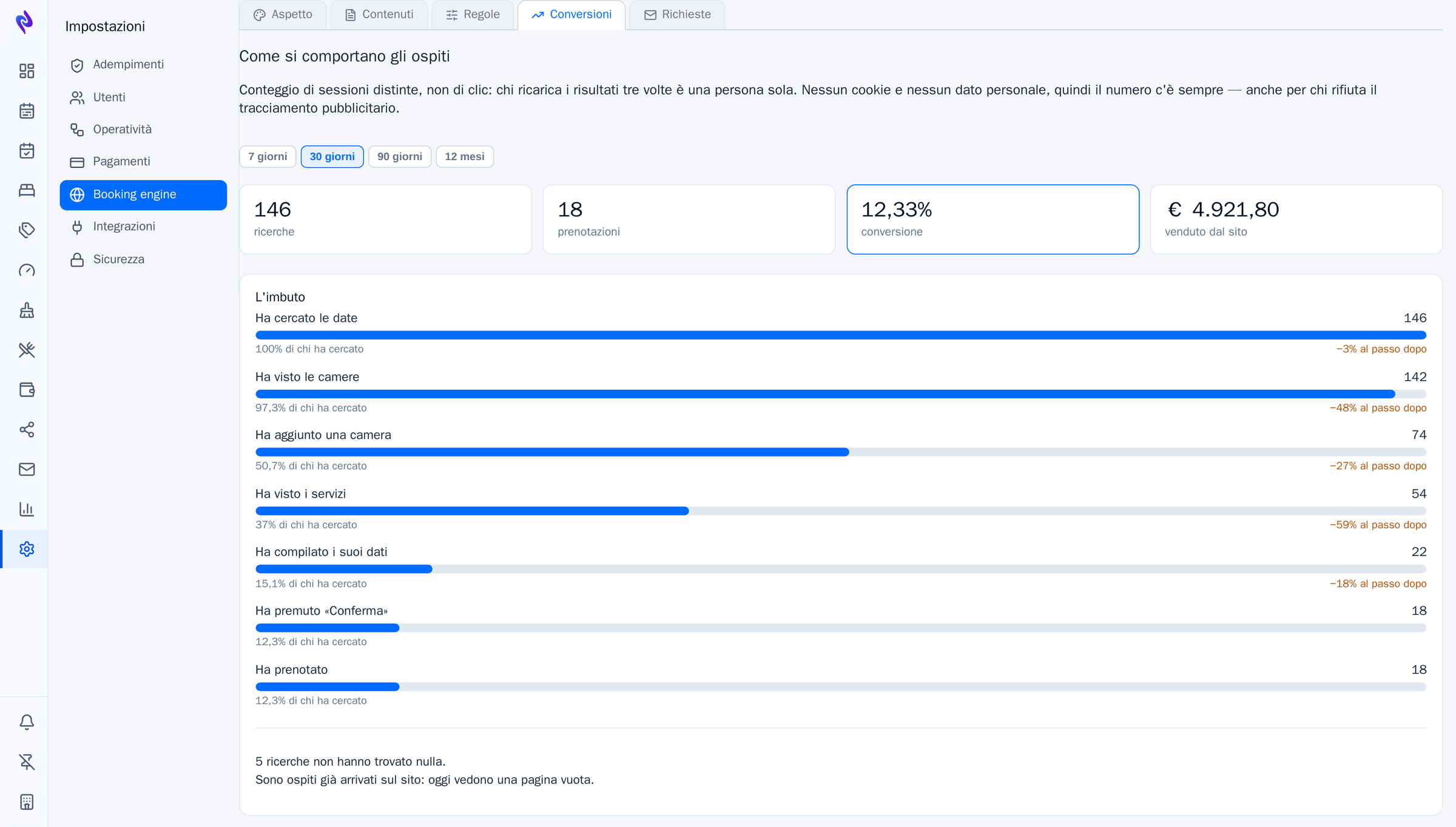
If those dates have nothing, the site offers the nearby dates that do, or the rooms that fit if the party changes. And if that isn't enough, the guest leaves an enquiry: it lands in OS as a quote to write, and Ambra can draft the reply.
A guest who picked a room and stopped short of confirming gets a reminder with their basket in it. The link rebuilds it at today's prices, not yesterday's.
Italian, English, German, French and Spanish, with room and rate names translated wherever you translated them. Prices can be viewed in another currency; the charge stays in yours.
There is no need to rebuild the hotel's website: a snippet to paste puts availability search inside the page that exists, and the booking carries on from there.
The property appears in search results and on Maps with a link to the direct site, through Google's free booking links. OS prepares the feeds every night.
Tag Manager, GA4 and Pixel switch on by pasting an ID, and only fire after the guest says yes. Configure none of them and no banner appears — a cookie notice on a site that sets no cookies is just one more obstacle before a booking.
A guest arriving from a search doesn't always know whether they are on the hotel's site or on another shop window. The strip at the top says so in two words, next to the phone and the email the front desk actually answers — not a support line.
What a basket costs is worked out in one place, and stays tied to that basket — rooms, extras and code included — right through to confirmation. There is no case where you are quoted one thing and confirm another.
Away from the front desk
The dining room, the floors and maintenance never enter the PMS: they open an address and see the day's work, and nothing else — no guest names, no prices. What they tick there comes back into OS: a room marked clean changes state on the tableau, a fault appears at reception, the covers served this morning correct tomorrow's forecast. And when somebody leaves you revoke their link, not everybody's password.
The three pages are shown in Italian.
Staff · add-on module
Front desk, housekeeping, restaurant, kitchen and maintenance in one staff register, across several hotels of the same group too. You prepare the week, publish it, and at the end confirm the hours worked. The shift is written where the data that says how much work there is already lives: arrivals, tomorrow's departures, covers.
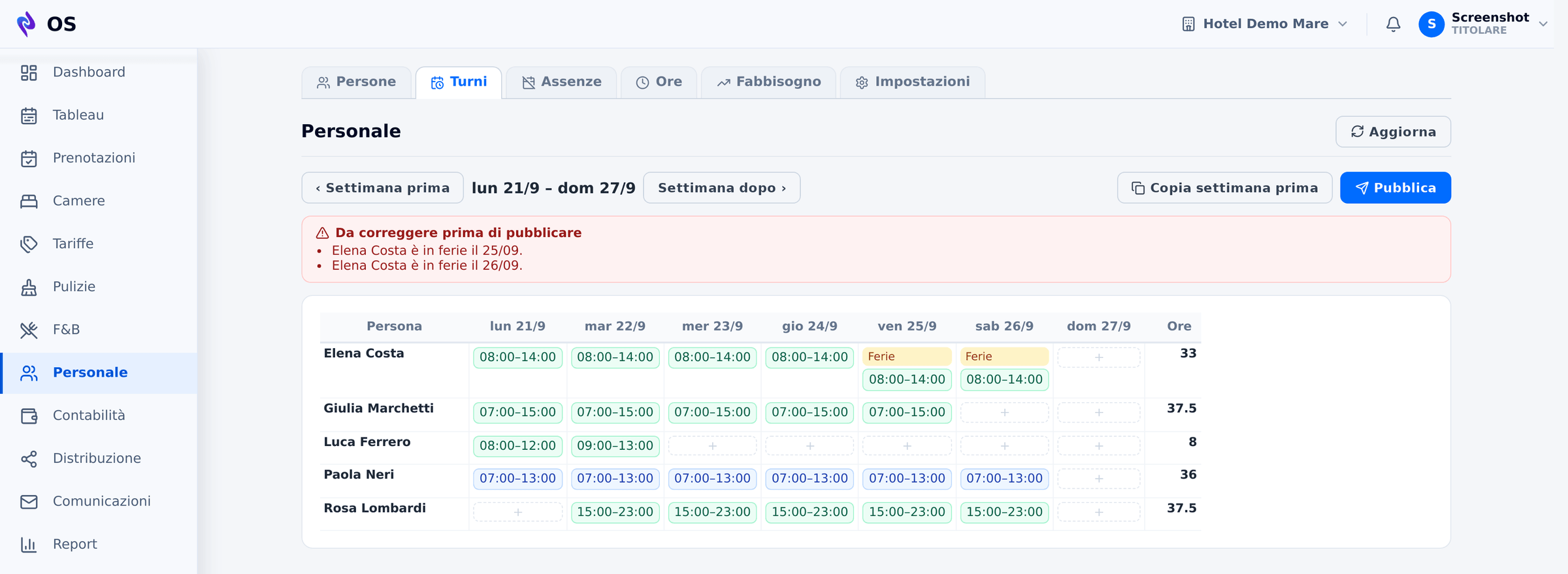
Shift templates, copy last week and bulk placing: «Giulia Monday to Friday, 7–15» is a single action. A head of department plans and publishes their own departments, not everyone else's.
Someone who works in two properties of the group has one record. If two shifts overlap, even in different hotels, the week cannot be published until it is fixed.
Holidays are approved by management, and a shift on top of approved leave blocks publishing. Rest between one working day and the next, weekly rest and the 48 hours are warnings, not bans: in high season you choose knowing it.
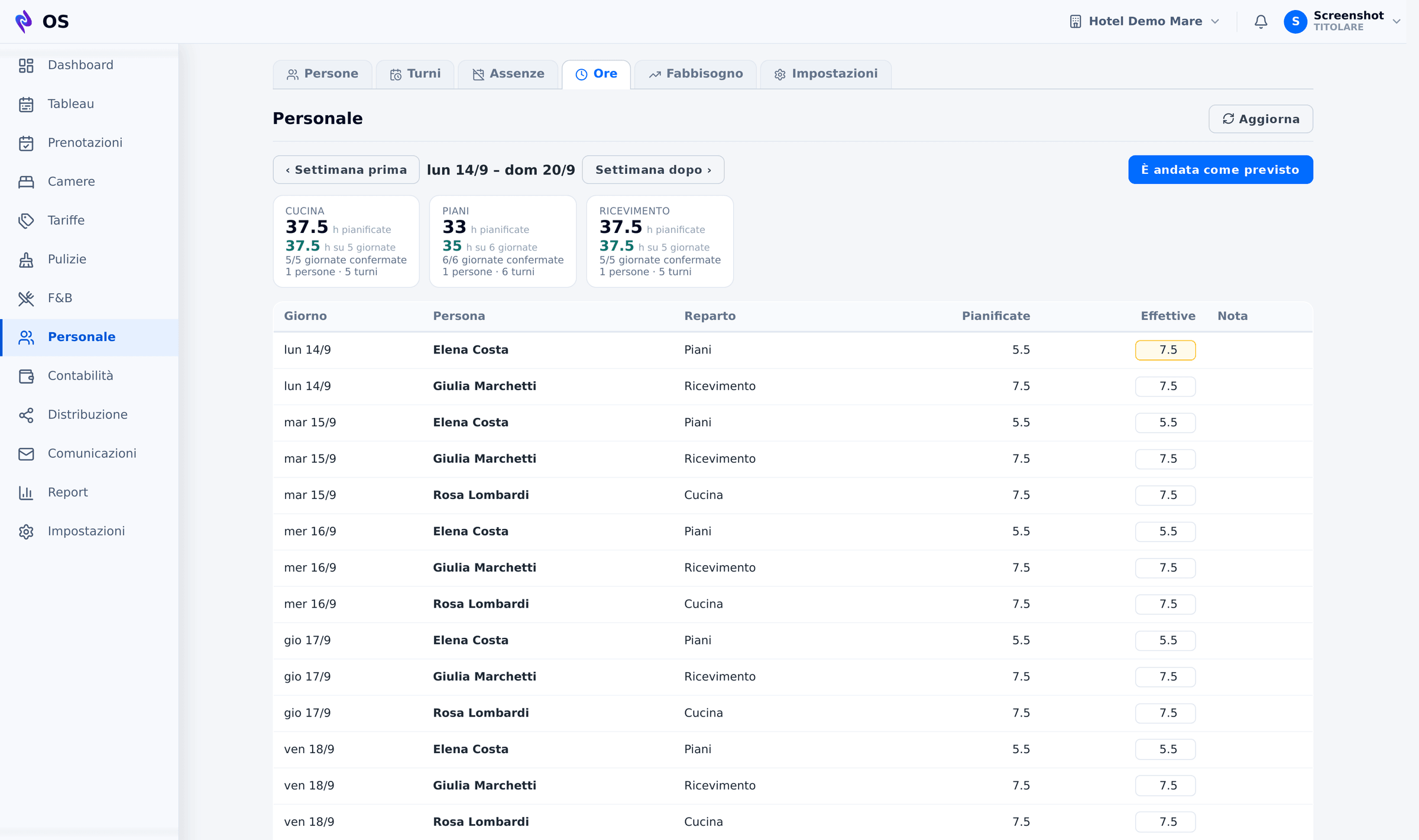
At the end of the week «It went as planned» confirms the hours, and where it went differently you correct the line. Totals are by department, not by person.
From the arrivals, departures and covers already booked, with minutes per room measured on that property, OS estimates the hours needed in housekeeping, at the front desk and in the restaurant, next to the ones planned. It is an estimate from today's bookings, and it says so: the further away the day, the more it underestimates.
It does not clock people in and it does not run payroll: management confirms the hours. And shifts are seen by whoever signs in to OS — there is no personal phone page for each member of staff yet.
Compliance
Tourist tax and VAT are not a separate module to fill in: they are worked out from guest nights and documents already recorded. What in many properties is half a day at month end is a screen to check here.
No overbooking
Availability is checked against the inventory rules on every write, whichever channel the booking arrives from. Selling the same room twice is not a mistake to correct afterwards: it is an operation the system refuses.
More than a PMS
RatePilot, CostCore and Ambra sell on their own too. But on top of OS they are not three more programs to keep open: their features are used inside the PMS, on the same account — and they cost far less than they do separately.
Reads occupancy and pickup, works the prices out every night, reviews the near dates during the day and writes them back onto the tableau, ready to sell.
Takes the revenue from OS and puts it beside the costs, department by department, so you know what is left.
Answers enquiries and builds quotes on the real availability and the real prices in OS.
Pricing
Almost no Italian hotel system publishes its prices: you ask for a quote and find out the number at the end. We write it down. Annual fee per property, VAT excluded, covering the PMS, the channel manager, the direct booking site, fiscal documents and statutory reporting. No activation fee. The extras are RatePilot, up to 45 units, Ambra, CostCore and the Staff module.
| Units | OS alone | With RatePilot |
|---|---|---|
| up to 10 | €900 | €1,500 |
| 11-20 | €1,400 | €2,200 |
| 21-30 | €1,900 | €3,000 |
| 31-45 | €2,600 | €4,100 |
RatePilot stays optional and can be added whenever you want, without redoing the contract: €600 more up to ten units, €1,500 up to forty-five. On its own, without OS, it costs more.
| Units | Annual fee | Per room, per month |
|---|---|---|
| 46-60 | €4,800 | €6.70 - 8.70 |
| 61-80 | €5,800 | €6.00 - 7.90 |
| 81-110 | €7,200 | €5.50 - 7.40 |
| 111-150 | €9,000 | €5.00 - 6.80 |
| over 150 | tailored | from €5.00 |
Above 46 units revenue management is not a module to buy: it is inside the fee.
| Units | OS + Ambra | OS + RatePilot + Ambra |
|---|---|---|
| up to 10 | €1,500 | €2,100 |
| 11-20 | €2,200 | €3,000 |
| 21-30 | €3,000 | €4,100 |
| 31-45 | €4,000 | €5,500 |
| 46-60 | €6,600 | €6,600 |
| 61-80 | €8,000 | €8,000 |
| 81-110 | €10,100 | €10,100 |
| 111-150 | €12,800 | €12,800 |
| over 150 | tailored | tailored |
Ambra can be added whenever you want, and on top of OS it costs far less than on its own: from €600 more a year up to ten units, €1,400 up to forty-five. From 46 units RatePilot is already in the fee, which is why the two columns match.
| Units | OS + CostCore | With treasury |
|---|---|---|
| up to 10 | €1,700 | €2,700 |
| 11-20 | €2,200 | €3,200 |
| 21-30 | €2,900 | €4,200 |
| 31-45 | €3,600 | €4,900 |
| 46-60 | €6,000 | €7,600 |
| 61-80 | €7,000 | €8,600 |
| 81-110 | €8,600 | €10,600 |
| 111-150 | €10,400 | €12,400 |
| over 150 | tailored | tailored |
CostCore can be added whenever you want, and on top of OS it costs far less than on its own: from €800 more a year up to twenty units, €1,400 up to one hundred and fifty. Revenue already comes from the PMS, and activation is included with a twenty-four-month commitment (otherwise €300). Treasury covers up to three banks per property. Below 46 units RatePilot, if you want it, is added separately.
| Units | Extra, per year |
|---|---|
| up to 10 | €180 |
| 11-20 | €290 |
| 21-30 | €390 |
| 31-45 | €540 |
| 46-60 | €790 |
| 61-80 | €990 |
| 81-110 | €1,250 |
| 111-150 | €1,590 |
| over 150 | tailored |
Shifts, holidays, hours and staffing needs for every department. Paid per property, each on its own band; someone who works in several hotels of the group stays one person.
Guided setup, one ninety-minute session with a real person, the video library and a check on your first channel connection: included in the fee. The session is for the people who will use OS every day; the rest of the staff learn from the videos.
If you would rather be walked through it: assisted start in three sessions +€390, or a day on site +€790.
Two days on site with a twenty-four-month commitment: setup and training for your department leads (front desk, housekeeping, accounts), who then bring their colleagues along. Everyone else has the videos.
Without the commitment, activation is €1,200. If you would rather we train the whole staff ourselves, extra days are €600.
Bringing years of bookings and guest records across from another system is bespoke work, and it is quoted separately.
We tell you before you sign, not after.
Billed annually in advance; up to 45 units monthly billing is available (+15%). Seasonal properties −15%. Second property −10%, fifth and beyond −15%. Prices exclude VAT.
We'll show you the PMS with your property in front of you, not a generic demo.
Request a demo